Thumbnail Generator
Packaging is half the battle on YouTube. A great video with a weak thumbnail simply will not get clicked. VidRush’s built-in Thumbnail Generator creates click-worthy thumbnails during video generation, with nearly no design skills or external tools needed.
It is available on every plan. Thumbnail costs are separate from your video’s generation cost, and two things draw on your credit balance once you pass their monthly free allowance: saving a reference channel, and generating extra variations. See below.
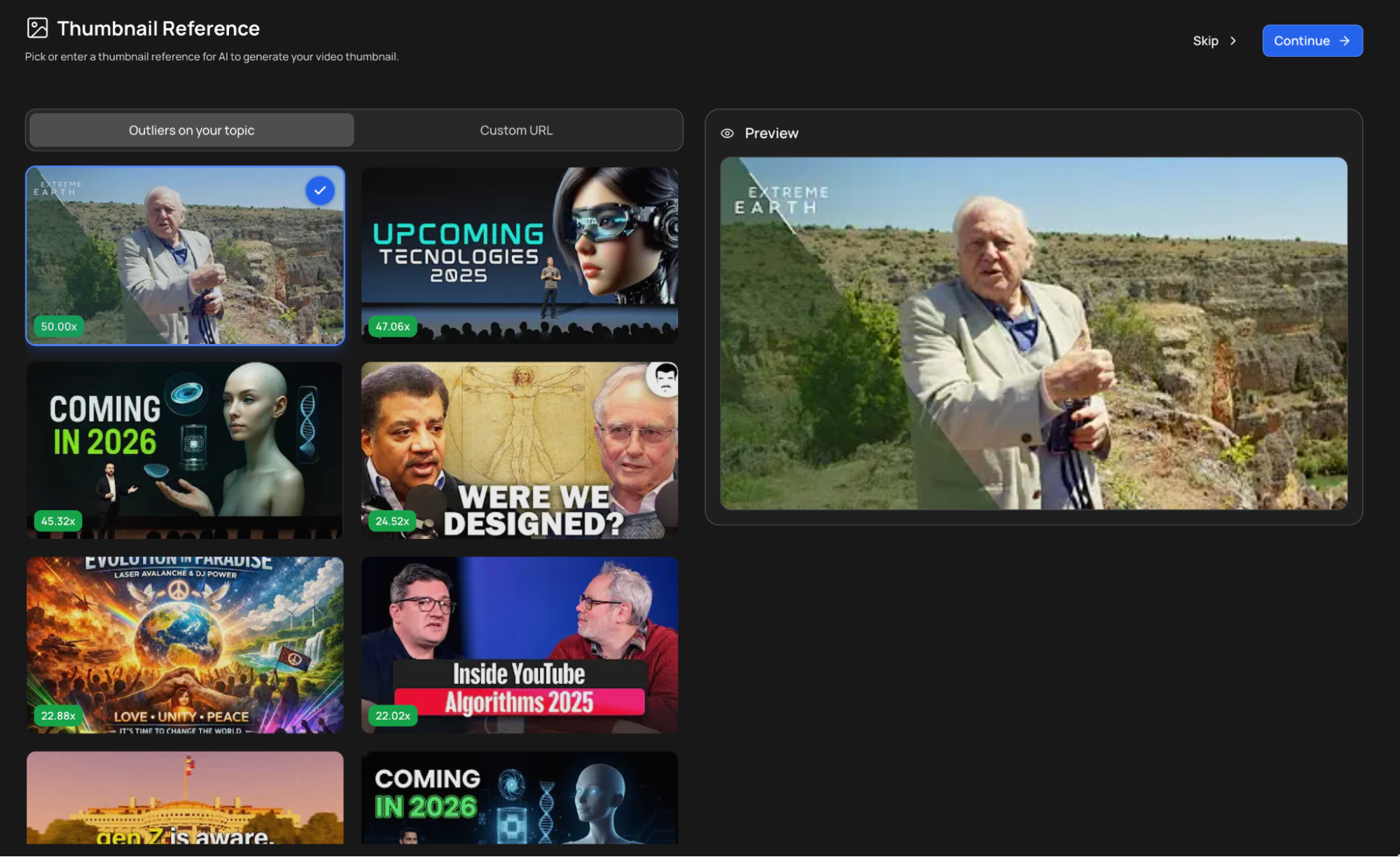
Where you pick your thumbnail
Thumbnail selection is its own step in the creation flow, after you approve the Quote Statement. You land on the Thumbnail Reference page, set up what you want, then press Generate video.
If you would rather not bother, press Skip and generate instead.
Skipping is final for this video. VidRush picks the thumbnail for you, and it cannot be changed afterwards. If you care about the thumbnail at all, spend the few seconds on this step.
Anything you spend here is on top of the video’s estimate. You approve the Quote Statement before this step, so variations and reference channels are charged separately from the figure you already saw.
The three tabs
Outliers on your topic
This is where the thumbnail’s look comes from. Three ways to set it:
- Pick a recommended thumbnail. VidRush finds high-performing thumbnails on your topic and shows them with their outlier score, so a thumbnail marked 64x pulled roughly sixty-four times its channel’s normal views. Pick one and your thumbnail is built on its layout.
- Enter a reference video. Paste a YouTube link and its thumbnail becomes the reference.
- Upload an image. Use your own reference instead.
The preview on the right updates as you choose, so you can see what you are getting before generating.
Reference Channel
Instead of a single thumbnail, point at a whole channel and VidRush uses that channel’s thumbnails as the reference.
Three channels are free to save each month, then 20 credits each. You can save up to three, and one is used at a time. Select the one you want for this video.
Each saved channel shows what VidRush read from it: primary and accent colours, and a description of how that channel builds its thumbnails, including the recurring formats it rotates between. That is the style your thumbnail inherits.
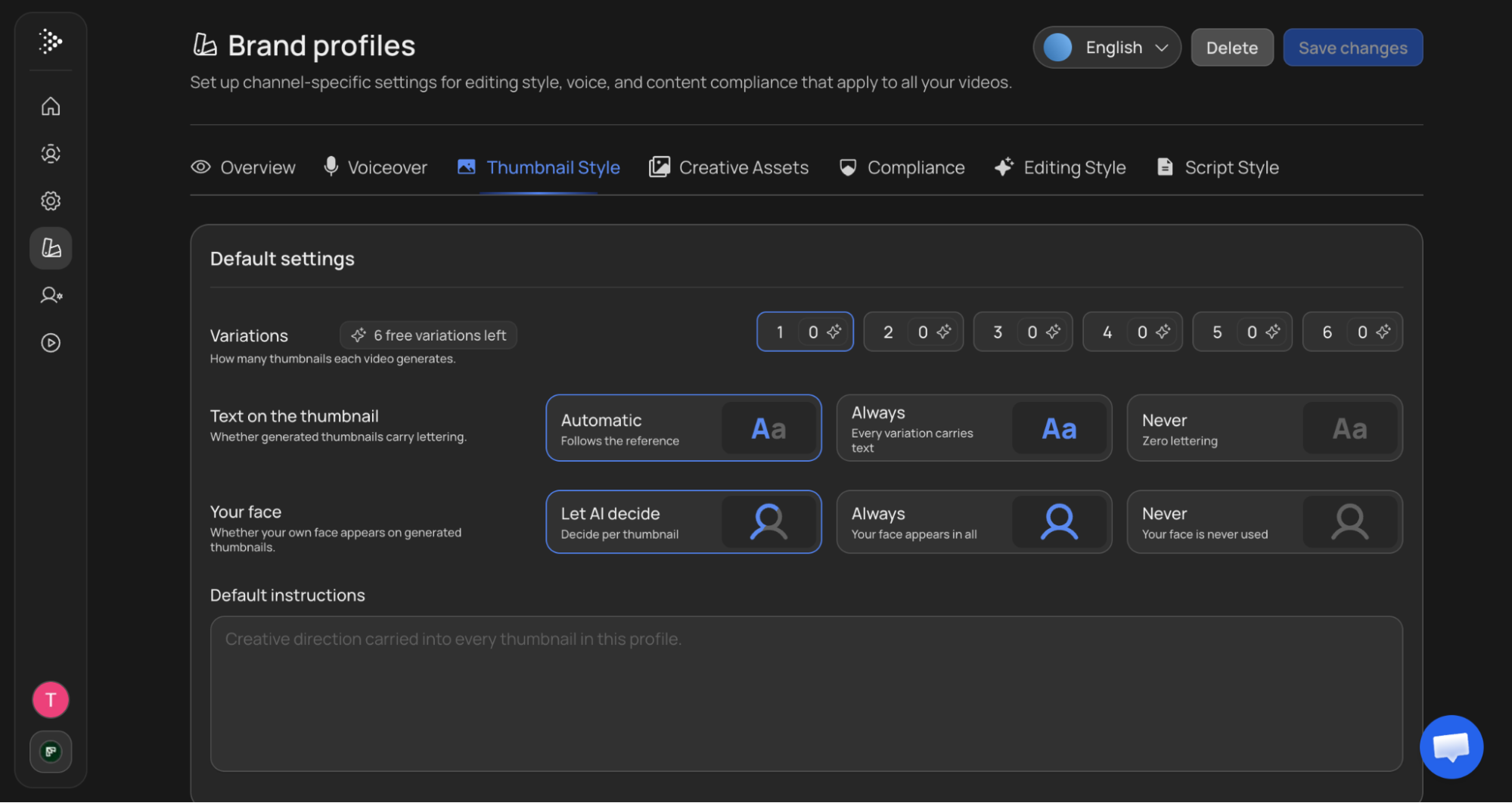
Settings
| Setting | What it does |
|---|---|
| Variations | How many thumbnails this video generates, from 1 to 6. Six are free each month, then 15 credits per image |
| Text on the thumbnail | Automatic follows the reference, Always puts lettering on every variation, Never produces none |
| Your face | Let AI decide chooses per thumbnail, Always puts you in all of them, Never keeps you out |
Your face applies when you are using Talking Head or an AI Avatar. By default the face on the thumbnail matches the presenter in your video.
To use a different one, tick Use a different face from the one in my talking-head video and upload a photo. It replaces the face on whatever reference you picked, whether that was a recommended thumbnail, an uploaded image, or a reference video. PNG, JPEG or WebP, up to 20 MB. The photo stays on this project until you remove it.
Default instructions is a free-text field for creative direction, for example “make this thumbnail black and white while preserving the style it is referencing”. Anything you put here carries forward to future thumbnail generations rather than applying only to this one.
Setting your defaults in the Brand Profile
Everything on the Settings tab can be set once per Brand Profile, under the Thumbnail Style tab. Variations, text, face, and default instructions all live there, and every video made with that profile starts from them. See Brand Profiles.
Reference channels are also saved on the Brand Profile, under Train a channel. When you add one, VidRush asks whose channel it is:
- My channel. The presenter shown is based on your avatar settings.
- Someone else’s. Style only. That channel’s presenter is never reproduced.
How it works
VidRush does not just read your title. It analyses the full context of your topic to design a thumbnail that fits your niche and format.
Context-aware design. The AI understands what your video is about. A video on “The 2008 Financial Crisis” gets financial imagery, dramatic contrast, and red arrows, not generic stock art. Your title and your chosen reference steer this, so the output stays aligned with your creative direction.
Outlier matching. The system studies high-performing thumbnails in similar formats and mimics layouts proven to drive clicks in your space. That is what the multipliers on the Outliers tab are showing you.
Format transferring. Pick a reference thumbnail style and the AI adapts that layout to your topic. Take a successful “Vs” comparison layout from the tech niche and apply it to a history video: same proven structure, completely different content.
Your title does a lot of the work here. If the AI generated a title that strays from your usual format, fix it in the Quote Statement before you approve, because the thumbnail is researched and designed around whatever title the system has. The title it works with should be the one you would actually publish with.
Tips for better results
- Pick a reference from your own niche, or one close to it. A fitness reference produces better results for a fitness video than a random gaming thumbnail would.
- Be specific with your reference. The more relevant it is, the better the AI matches style and layout to your topic.
- Think about contrast and readability. Thumbnails that work on YouTube have bold colours, clear focal points, and minimal text. The AI performs best when your reference follows those principles too.
- Lock your title first. A placeholder title produces a placeholder-quality thumbnail.
- Generate more than one variation if you are unsure. Choosing between six is easier than describing what you want in advance.
Good to know
- Thumbnails cannot be regenerated after the fact. Set your variations before you generate rather than planning to try again.
- Skipping the step cannot be undone. VidRush picks for you and the result is fixed for that video.
- Reference channels are stored on your Brand Profile, not on the video, so once you have added a channel it is available on every video made with that profile.
- Default instructions persist. Anything you write there carries into future thumbnail generations, so clear it out when it no longer applies.
- Thumbnail costs are separate from your video. The thumbnail step happens after you approve the Quote Statement, so nothing here is part of that estimate. Variations and reference channels are charged on their own, each against its own monthly free allowance. See Credits & Billing.