AI Avatar
Pick a presenter, give them a background and a voice, and VidRush builds the video around them. You can use one of VidRush’s published avatars, or create a custom avatar from a photo of yourself; see Custom Avatar. Your avatar becomes the A-roll: VidRush writes the script, generates the delivery to camera, layers B-roll over the narration, adds captions and your theme, and assembles the finished video.
This is the option when you want someone on screen without filming anything. Everything after the selection works the way it normally does: prompt field, reasoning effort, Quote Statement, and editor. AI Avatar is in beta. A banner on your home screen points to it when you open VidRush.
If you would rather appear yourself, see Talking Head.
How to use AI Avatar
- Open the prompt window and select Use AI Avatar, either from the tab above the input box or the + button in the bottom left.
- Choose Preset Avatars or Custom avatar.
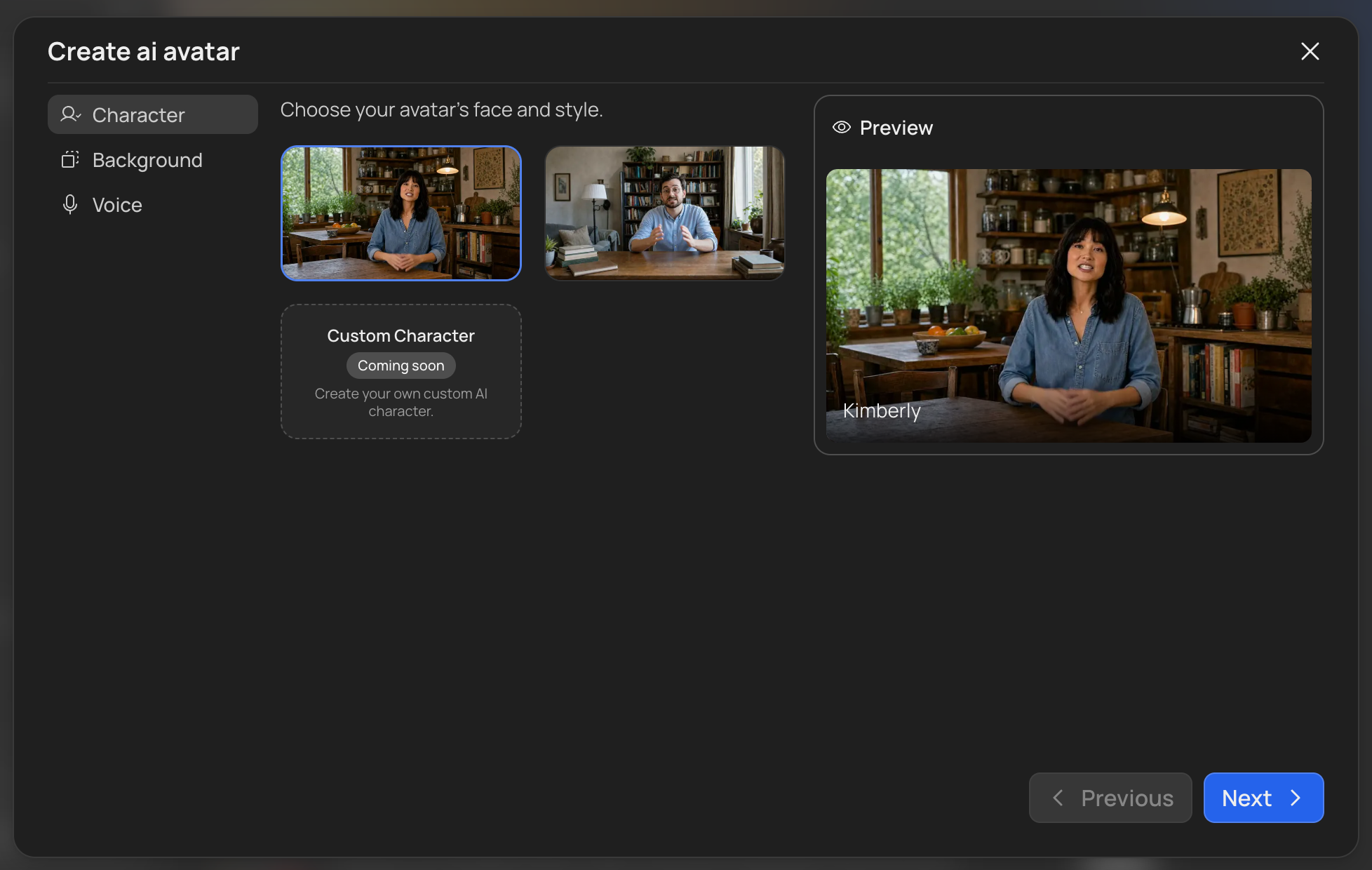
- Preset Avatars. Pick from the avatars published by VidRush, then choose a background and voice.
- Custom avatar. Build a presenter from one photo of yourself. See Custom Avatar for the full flow.
- Write your prompt.
- Pick your reasoning effort.
- Review the Quote Statement and approve.
VidRush takes it from there.
Choosing your avatar
Choosing Preset Avatars puts you in VidRush’s published set rather than building one. Two are available at the moment, with more on the way. To make a presenter of your own instead, see Custom Avatar.
- The avatar is who appears on screen. Pick for your niche rather than for looks, because viewers read a presenter against the subject within a second of the video starting.
- The background sits behind them. Keep it plain, since a busy background competes with your captions and B-roll.
- The voice is chosen from two or three that suit that avatar, rather than the full Voice Selection library.
Background and voice can be changed later. The avatar itself cannot, so if you want the other one you start a new selection.
Listen to the voice while looking at the avatar. A presenter who does not sound like they look is more noticeable than either choice on its own.
What AI Avatar cannot do
- Speak German or Spanish. Avatar videos are English only, even though prompts are accepted in three languages. See Multi-Language.
- Put two presenters on screen. One avatar per video, the same single-presenter rule that applies to Talking Head.
- Use your own voice. The avatar speaks with the voice you picked. Custom Voiceover cannot be combined with an avatar.
- Combine with Talking Head. One generation uses your own footage or an avatar, never both.
- Run on Mini. Mini is an image-only model and cannot render a presenter, so avatar projects use Deep Video v1 Pro.
- Change the avatar after generating. Background and voice can be changed later, but the avatar cannot. Switching presenter, preset or custom, means starting a new generation.
How your prompt is checked
A video with a presenter in it can be mistaken for real footage of a real person, so avatar prompts are held to a stricter standard than ordinary ones. The check runs before rendering starts.
Some subjects get a warning. Elections, public health, finance, and breaking news are flagged when they appear in your script or your video’s title and description. You can proceed. The warning is there because YouTube scrutinises AI-generated video on these subjects far more heavily than anything else, so a video VidRush is happy with can still be restricted once you publish it.
Some specifics are refused outright. Certain named financial assets, medical terms, and terms tied to live news events are blocked before rendering begins. The list behind this is updated as events develop, so it is worth re-reading your prompt rather than assuming a refusal is a mistake.
Your avatar cannot pose as someone it is not. All of these are refused:
- Presenting as medical staff, a laboratory worker, police, military, or a judge.
- Reading contracts, terms of service, earnings reports, or court statements as though speaking for the organisation behind them.
- Anything built to resemble a live bank teller, a government agent, or a tech support line, including looping and interactive formats.
- Scripting the avatar as a real, identifiable person, so the video reads as that person speaking.
Most of this is about who your avatar appears to be rather than what you can cover. A documentary about a medical breakthrough is fine. An avatar in scrubs telling viewers what to take is not. The full rule set is on Input Validation.
Example videos
Finished videos made with AI Avatar, so you can see how a presenter, background, and voice read once the B-roll, captions, and theme are layered around them.
Good to know
- You can supply your own script, but not your own audio. Attach a Custom Script and your avatar will deliver it in the voice you selected. Uploaded audio and avatars are mutually exclusive. To change how the avatar sounds, change its voice. See Voice Selection.
- The avatar is a presenter, not a performer. It delivers narration to camera. It does not demonstrate, gesture at things on screen, or react.
- No extra cost, no plan requirement. Avatar videos are charged on the finished output exactly like any other video, and the feature is available on every plan. Saving a Custom Avatar is free too; the presenter is generated as part of the video. See Credits & Billing.
- Your Brand Profile still applies. Theme, captions, compliance settings, and blacklists all shape the video built around your avatar. See Brand Profile.
- A blocked prompt costs nothing. Credits are not reserved or deducted when a check fails. → See Input Validation.