Credits & Billing
VidRush uses a credit-based billing system. Every video you generate consumes credits based on two factors: the visual model you choose and the reasoning effort level you set. Credits are deducted when a video completes, not when it enters the queue.
Credit costs per minute
| Visual Model | Reasoning | Credits / Min | Notes |
|---|---|---|---|
| Mini (Image) | Low | 25.6 | Lowest cost. Best for rapid testing. |
| Mini (Image) | Medium | 32 | High-quality image storytelling. |
| Persona I | — | 12.4 | Avatar-led. Requires a Custom Script and an avatar. |
| Pro (Video) | Low | 35.2 | Video B-roll included, used more sparingly. |
| Pro (Video) | Medium | 44 | The standard. Maximum quality and video density. |
| Mini / Pro | Experimental | 32 / 44 | The newest pipeline; use on test videos first. |
Coming soon: Deep Video V2 at a higher credit rate than v1 Pro.
Minimum charge. Every video has a floor: 30 credits on Pro and 21 on Mini, however short the finished video is.
A full-length video in the new 50–60 minute band costs roughly 2,200 to 2,640 credits on Pro + Medium, and less on the cheaper combinations.
Know the cost before you generate
The Quote Statement shows an estimated total credit cost for every generation before you approve it. The final charge can be slightly higher or lower, since billing follows the actual rendered length. If the estimate surprises you, adjust the duration in the Quote Statement and the estimate updates before any credits are spent.
What credits cover
The credit cost for each video covers the entire production pipeline in a single charge: AI research, scriptwriting, voiceover generation, music licensing, stock footage sourcing, motion graphics, thumbnail generation, and rendering.
Using a Custom Voiceover costs the same credits as AI-generated narration. The credit covers the full pipeline, not just the voice. The same is true of an AI Avatar video: it is charged on the finished length exactly like any other video, with no premium for the avatar. A Persona I video works the same way, and its rate covers the avatar too.
When credits are deducted
Credits are deducted when your video finishes generating, not when you hit generate or when the video enters the queue. If a generation fails due to a system error, you are not charged.
Your first render is included. The generation charge covers building the video and rendering it once, so the file waiting in Projects is complete and ready to publish. If you edit afterwards and render again, that render costs credits. See Rendering & Troubleshooting for the amount.
Other things draw on your balance separately from the video itself:
- Rush Agent actions. Billed individually and much smaller. They appear in your ledger as fractional deductions against the video they belong to. See Rush Agent.
- Re-renders, which cost 10% of the original generation.
- Style analysis, thumbnail training, and extra thumbnail variations, once you pass the free allowances below.
Nothing is charged for input that never reaches the pipeline. A prompt the checker blocks, or a talking-head recording rejected at upload, costs nothing at all.
Free allowances
Three features come with a monthly free pool. Once it is used up, they draw on your credit balance. Each pool is counted separately, so using one does not affect the others, and all three reset monthly.
| What | Free each month | After that |
|---|---|---|
| Editing Style or Script Style analysis | 3 runs | 20 credits per run |
| Thumbnail channel training | 3 | 20 credits each |
| Thumbnail variations | 6 | 15 credits per image |
See Editing & Script Style and Thumbnail Generator.
Thumbnail variations are counted per image, so generating six variations on one video uses the whole monthly pool. If you want several options on several videos, it is worth being selective early in the month.
Where credits come from
Your balance can be fed from three sources, spent in this order: plan credits (granted monthly, rolling over up to the cap below), then a top-up balance (bought upfront, survives renewal), then Pay-As-You-Go (charges your card in $100 steps). Each portion of a spend shows as its own line in the ledger. See Top-Up Credits and Pay-As-You-Go.
Credit renewal
Credits renew on your billing date each month. Unused credits carry into the next month, up to half your plan’s monthly allotment. Anything above that expires at renewal.
So on Starter, with 2,000 credits a month, up to 1,000 can carry. Finish the month with 600 left and you start the next one with 2,600. Finish with 1,400 left and 1,000 carries while 400 expire, so you start with 3,000.
| Plan | Monthly credits | Maximum carried | Highest balance at renewal |
|---|---|---|---|
| Starter | 2,000 | 1,000 | 3,000 |
| Creator | 6,000 | 3,000 | 9,000 |
| Pro | 18,000 | 9,000 | 27,000 |
| Scale | 50,000 | 25,000 | 75,000 |
| Studio | 150,000 | 75,000 | 225,000 |
Rolled-over credits are ordinary credits. They are not a separate pot and they are spent like any other.
Rollover does not stack. Credits that carried over last month count as leftovers again this month and meet the same cap, so your balance at renewal never exceeds one and a half times your monthly allotment however many quiet months you have in a row.
On a yearly plan your credit pool still renews monthly, and rollover applies at each monthly refresh exactly as it does on a monthly plan. Yearly billing gives you two months free and the same monthly credit refresh.
Rollover is a benefit of staying subscribed. It applies when one paid month follows directly on another. Nothing carries through a pause, through a cancellation, or through a renewal that is never paid. If you cancel and come back later, you start with a full month’s credits and your old balance does not return.
Credits held by a video that is still generating are not part of your leftover total. They stay reserved for that video and are charged when it finishes, so they never count against the cap.
The credit ledger
Your Settings page includes a full ledger: every credit movement, line by line and icon-coded, covering top-ups, renewals, and spends. When a balance looks off, the ledger answers where it went. The settings page also shows what each minute of video costs on your current plan.
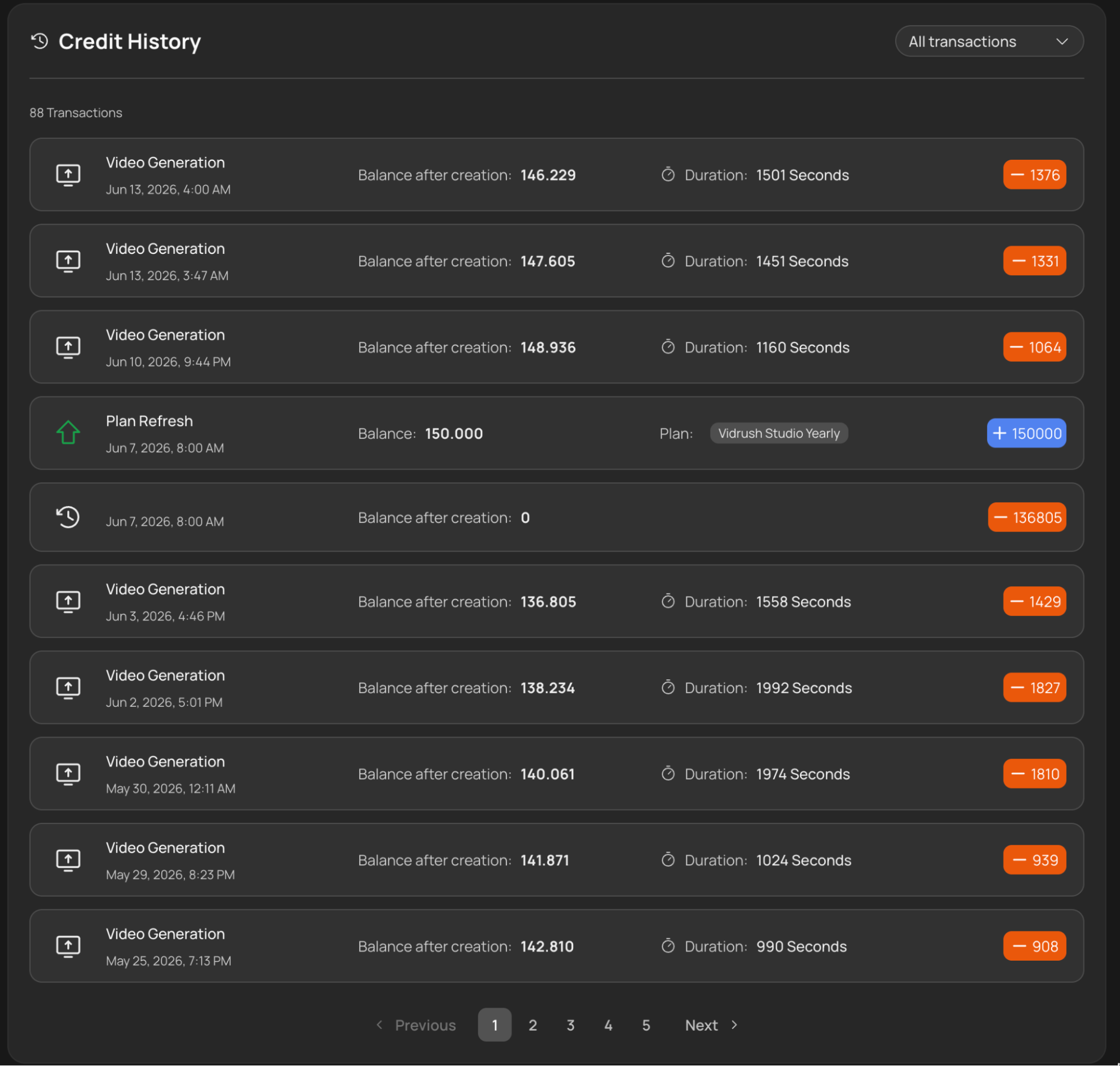
Two lines are worth knowing:
- Plan Refresh shows the month’s credits, with a tag for however much rolled over.
- Expired Credits shows anything that was above the rollover cap, so you can always see what was lost and when.
Billing cycle edge case
If you start a video before your credits expire but it finishes generating after your renewal date, the credits are deducted from your new monthly balance. This is expected behaviour: billing follows completion time, not start time.
Good to know
- Top-up credits work differently. They never expire at renewal and they do not count toward the rollover cap. See Top-Up Credits.
- An unpaid invoice blocks spending, whatever your balance says. See Failed Payments & Account Recovery.
- A blocked or rejected input costs nothing, so there is no risk in submitting something the checker might turn down. See Input Validation.