The Quote Statement
The Quote Statement is VidRush V2’s confirmation screen: the single place where you verify everything before a generation starts and credits are committed.
Since the format, duration, and mode menus were removed, the Quote Statement is how you stay in control. VidRush reads your prompt (or script, or audio), infers the settings, and then shows you its understanding for approval.
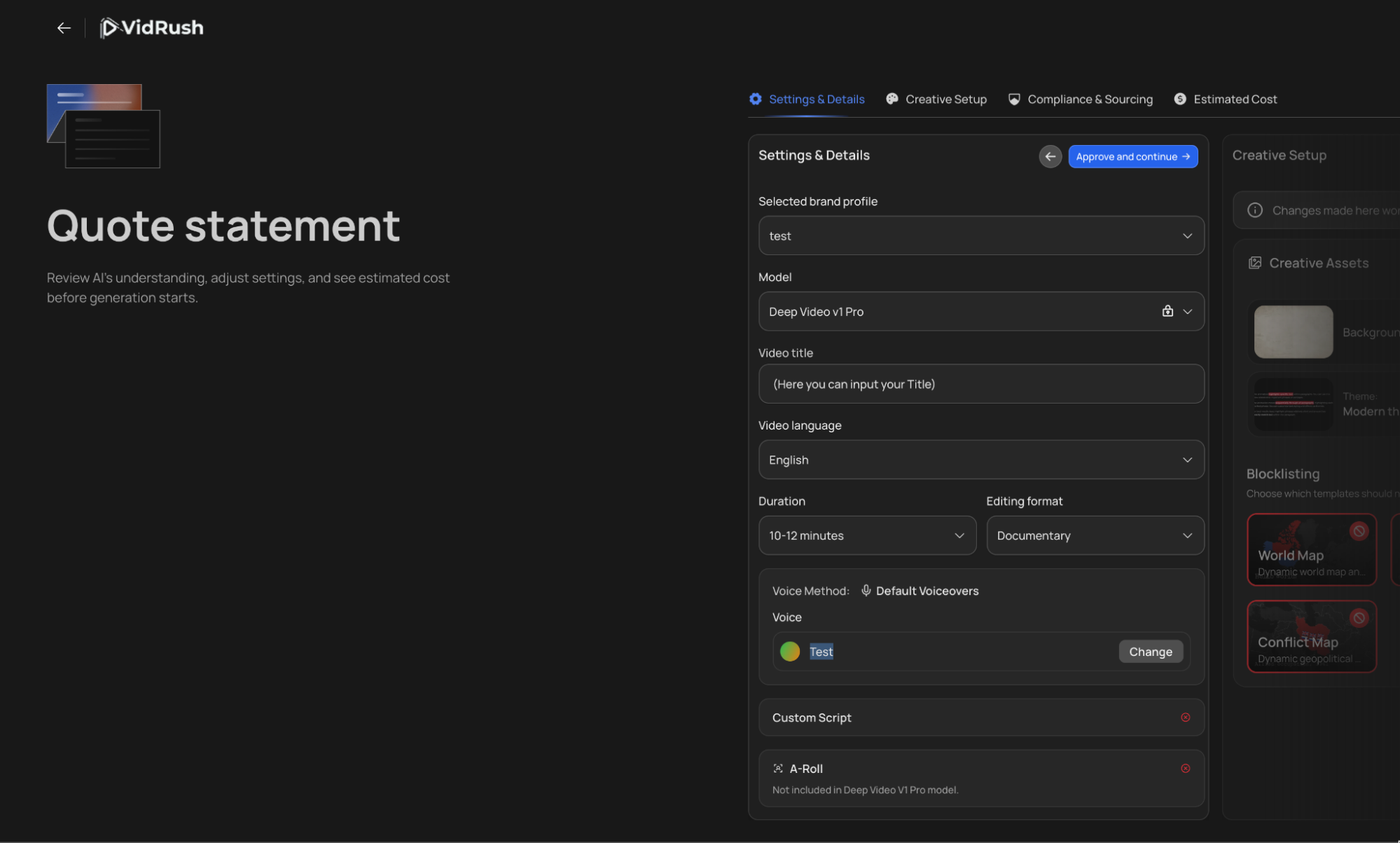
What the Quote Statement shows
- Format, for example “Your script is a documentary about American Ginseng, tracing it from…” Confirm the system understood your intent.
- Duration: the target length inferred from your prompt or script.
- Video language, from your Brand Profile.
- Model: Mini or Pro, plus reasoning effort.
- Brand Profile: which profile, and therefore which theme, backgrounds, and compliance rules, will be applied.
- Voice: your Brand Profile default, overridable right here.
- Title: the video title VidRush will work with.
- Attachments: your Custom Script or Custom Voiceover, if provided.
What to check and change here
The title, especially for thumbnails. The thumbnail is generated around your title and its format. When the AI invents a title that is wrong or off-brand and that is nothing like your channel’s titles, fix it here before approving. A stronger title produces a stronger thumbnail.
The voice. To try a different narrator on one video, override it here; your Brand Profile stays untouched.
Format and duration. Correct them here if VidRush guessed wrong or you forgot to specify. With a Custom Script attached, leave the duration blank: the length is inferred from your text and voice speed.
Approving, and the credit estimate
When everything looks right, press Approve & Continue. A final screen shows the estimated total credits for this generation (around 1,430 credits for a long documentary, for example). The final charge can be slightly higher or lower, since credits follow the actual rendered length. Approve once more and VidRush takes you to the Thumbnail Reference page, where you set up your thumbnail or skip the step; see Thumbnail Generator. Press Generate video there and your video enters the queue. During busy periods the queue can take a little while before the progress bar appears; generation then typically takes 50 to 60 minutes.